


Pairing (modes A, B, C)
- Press and hold SET and − at the same time for at least 3 seconds and switch on the device using the On/Off switch.
- The screen displays A, B or C.
- The device is not in the desired mode? Switch it off and back on in the same way until you obtain the correct mode.
| Mode | Role |
|---|---|
| A | Master (instructor). It must always be switched on so that the other devices can connect to it. |
| B | Student (rider) |
| C | Student (second rider) |
Changing the channel
- Switch off the Master (A) device using the switch.
- Press SET while switching the device back on. The padlock symbol is no longer visible on the screen: the device is unlocked.
- Select the channel with + / −.
Pairing a Wireless 2-Way earpiece
The Wireless 2-Way earpiece is always automatically in mode C. To connect it, switch it on while pressing SET: it automatically searches for available signals. As soon as it detects the signal from the Master device (A), its indicator turns green.
Microphone and earpiece volume, MUTE
- Connect the headsets to the devices.
- Earpiece volume: + and − buttons.
- Microphone volume: First switch off the device, then press SET while switching it back on. Once the device is unlocked, adjust the microphone volume with SET.
- MUTE: Hold SET to mute the microphone. The screen displays “MUTE” and the other users can no longer hear this device. Hold SET again to unmute.
Additional information
Using the earpieces
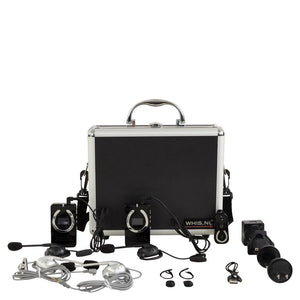
Make sure the earpieces are still firmly inserted. Using the cable clip, you can attach the headset to the chin strap of your riding helmet. WHIS accepts any earpiece with a 3.5 mm jack using the CTIA standard (generally, all mobile phone headsets). Sound quality depends on the earpieces used.
Listen-only mode
Connect the microphone and earpiece to the top of the device; it does not matter which device you connect either one to. Use only the WHIS earpiece and microphone provided.
Recharge the device
- Use only the original charger.
- Choose the plug suitable for the sockets in your country and attach it firmly (click system).
- Switch off the WHIS device during charging.
- Connect the charger to the charging port at the bottom of the device, under the rubber cap. During charging, an indicator light comes on at the top of the device.
- When the battery is fully charged (after 3 to 4 hours), the indicator light goes out. Then unplug the charger from the socket.
Safety instructions
- Keep the device out of reach of children and animals.
- The packaging contains small accessories that may be swallowed or inhaled.
- Avoid heating above 60 °C; do not expose it to sunlight or fire for extended periods.
- Stop using the device immediately if it overheats or if there is a problem with the charging connector.
- Do not expose it to moisture or water.
- Avoid short circuits.
- Do not damage or disassemble.
- Stop using the battery immediately if it is defective.
- Use only original parts.
- After use, switch off all devices.
- Use only the original charger and always unplug it after charging.
- If the unit is not used for an extended period, recharge the battery approximately every 3 months.
- Recharge the battery only at an ambient temperature between 10 °C and 40 °C.
- Dispose of the unit or used parts at a special-waste collection point, or return them to your retailer.
- Damage resulting from improper handling is not covered.
Care and maintenance
- Before cleaning, make sure that the devices are switched off and disconnected from the charger.
- Clean only with a soft, dry cloth.
- Leave the earphones connected whenever possible: this helps prevent cable breakage and wear on the sockets.
- The integrated lithium-ion battery has a lifespan of 3 years / 800 charging cycles. To preserve it, avoid letting it discharge completely: a full discharge may damage it.
- Store the WHIS in a dry place. If you do not use it for an extended period, keep the battery half charged.
Possible problems
| Problem | Possible cause | Possible solution |
|---|---|---|
| The screen does not turn on | Battery empty | Recharge the battery with the device switched off during charging |
| No reception (no antenna signal) | Devices out of range | Reduce the distance between the devices |
| No reception (antenna signal present) | Earpiece cable broken | Replace the earpiece |
| Noise, interference or no sound | Interference | Switch both devices off and on again |
| Earpiece cable broken | Replace the earpiece | |
| Voice cannot be heard | MUTE function enabled | Disable MUTE |
| Earpiece cable broken | Replace the earpiece | |
| Little or no sound | Volume changed | Check the volume |
Warranty
WHIS offers a 2-year warranty on the device, starting on the day the new, unused product is purchased by the first buyer. Keep your proof of purchase as proof of warranty. Wear of sensitive parts, such as cables and earphones, is not covered.
The warranty is provided through repair or replacement of defective parts; replaced parts become the property of WHIS. The equipment must be used with care and caution.
The following are excluded from the warranty:
- breakage of the headset, earbuds and microphone cables;
- water damage;
- battery life: it is normal for the capacity of a lithium battery to decrease over the years (as with a mobile phone), depending on how and how often the device is used. WHIS may replace the battery at cost price;
- defects caused by improper use (incorrect voltage, handling error) or mechanical damage — correct use is as described in this manual;
- damage caused by wear and pulling;
- damage caused by modifications made by a third party;
- damage caused by rough use.
The warranty ends if the device is opened or repaired by anyone not authorized by WHIS. The statutory warranty of the country of purchase applies.
Environment
At the end of its service life, the device must not be disposed of with household waste: take it to a recycling point for electrical and electronic equipment. Used or defective batteries must be taken to a collection point for chemical waste or batteries.
Never dispose of batteries with household waste.
Compliance & technical specifications
Compliance
WHIS bears the CE marking in accordance with the R&TTE Directive 1999/5/EC. FCC-approved device (FCC ID: 2AUKHCOMPETITION), 2406–2476 MHz. Before using the equipment, comply with the regulations applicable in the country where you are located.
Technical specifications
| Parameter | Value |
|---|---|
| Frequency | 2.4 GHz |
| Talk time | 10 hours |
| Operating voltage | 3.4 – 4.2 V |
| Operating current | 93 mA |
| Power supply | 1200 mAh lithium battery |
| Transmission power | 100 mW |
| Sound power | 40 mW |
| Reception sensitivity | −102 dBm |
| Signal-to-noise ratio | 67 dB |
| Charging | DC 5 V, micro-USB |
WHIS® Competition Pro is a registered model. Designed and packaged in the Netherlands, with components manufactured in China.